 by
by Ransomware Recovery Planning for Small Businesses: Backups, Isolation and Response
Ransomware recovery starts before an attack. When important files suddenly become unavailable, employees cannot log in or a ransom message appears, the organization does not have time to design its first backup policy, find its insurance contact or decide which system should be restored first. Those decisions should already exist in a short recovery plan.
Small businesses do not need an enterprise-sized security department to improve ransomware readiness. They need to know which systems keep the business operating, maintain backups attackers cannot easily destroy, protect administrator accounts and practice a recovery process that does not reintroduce the same compromise.
This guide focuses on defensive preparation and recovery. It does not provide instructions for creating or deploying ransomware. The goal is to reduce disruption, preserve evidence and restore business services safely.
Ransomware Is Now Often a Data-Breach Problem Too
Older ransomware descriptions focused on file encryption. Modern attacks may also involve data theft and extortion. Attackers can threaten to publish stolen information even when a company can restore encrypted systems.
CISA’s #StopRansomware Guide describes both encryption and data-extortion scenarios and provides prevention and response guidance developed with U.S. government partners.
That changes recovery planning
- Restoring files may not resolve the data-breach impact.
- Legal and notification requirements may apply.
- Credentials may need to be reset even after systems are restored.
- Evidence should be preserved for investigation.
- Communications need to avoid misleading customers.
Recovery therefore includes technical restoration, investigation, identity security and communications.
Identify the Systems the Business Cannot Operate Without
During an incident, recovery teams need priorities. Restoring a low-value file server before the order system or identity service wastes precious time.
Create a critical-asset list
- Identity and login systems.
- Email and communications.
- Customer database.
- Accounting or payment systems.
- Ecommerce or booking systems.
- File storage required for daily operations.
- Production servers.
- Backup infrastructure.
- Internet/DNS services.
For each asset, document what it depends on. A customer portal may be useless until the database and identity provider are available.
CISA recommends understanding which systems and data are most critical and their interdependencies so organizations can prioritize restoration.
Backups Need to Survive the Attack
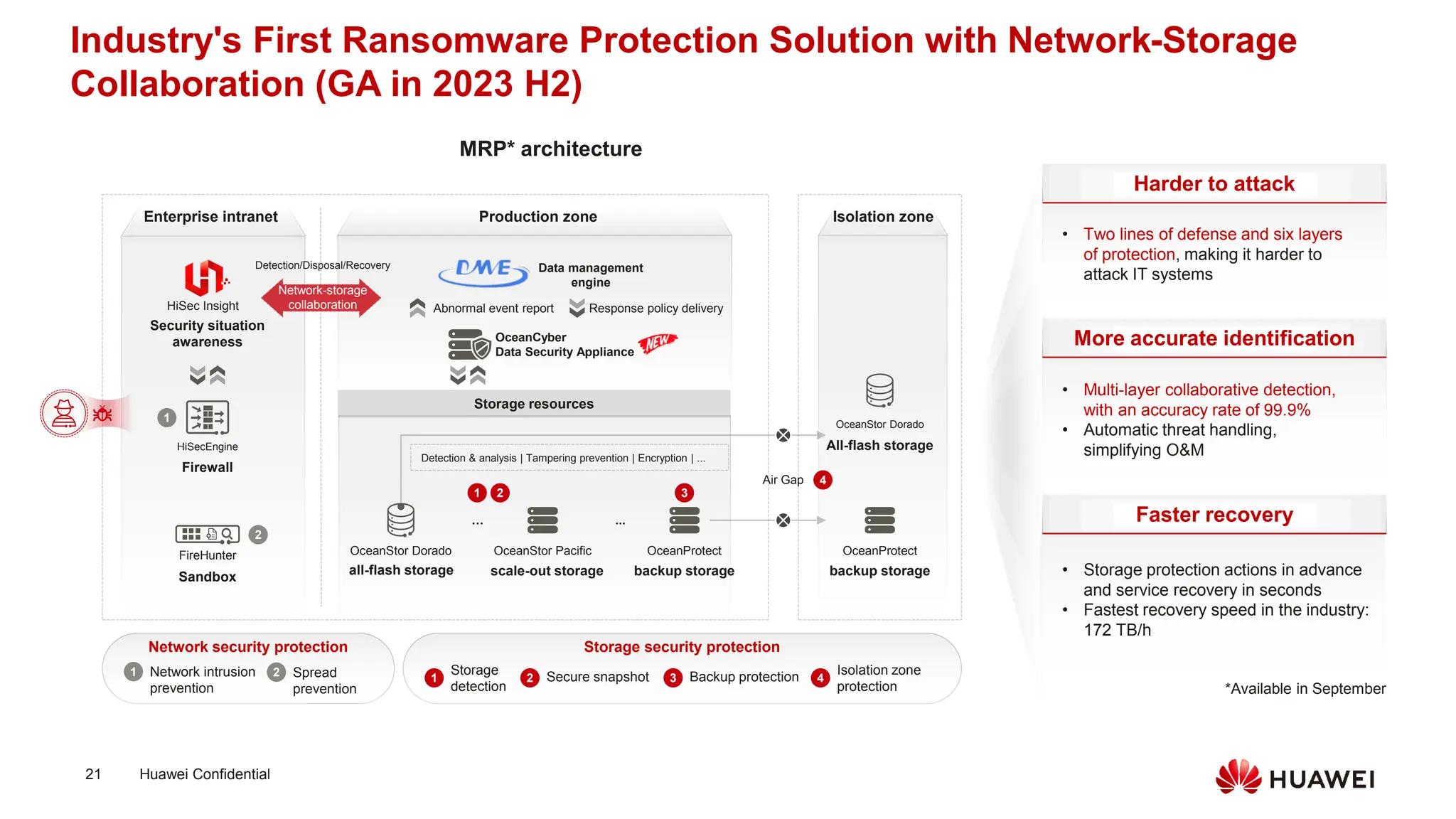
A backup mounted permanently to the same compromised environment may be encrypted or deleted along with production data. Ransomware recovery therefore requires some separation.
CISA recommends maintaining offline, encrypted backups of critical data and regularly testing their availability and integrity in a disaster-recovery scenario.
Useful backup protections
- Separate backup credentials from everyday administrator accounts.
- Keep at least one backup copy isolated from normal production access.
- Use immutable/object-lock capabilities where appropriate and correctly configured.
- Retain multiple restore points.
- Encrypt sensitive backup data.
- Monitor backup deletion and policy changes.
- Test restores regularly.
Our draft website backup strategy guide covers backup frequency, retention and restore testing in more detail.
Define Recovery Point and Recovery Time Objectives
A ransomware plan should answer two business questions.
Recovery Point Objective (RPO)
How much recent data can the business accept losing? If backups are every 24 hours, the potential data-loss window may approach a day.
Recovery Time Objective (RTO)
How quickly does the business need a critical system operational again?
| System | Example RPO question | Example RTO question |
|---|---|---|
| Ecommerce orders | Can we lose one hour of orders? | How long can checkout be unavailable? |
| File storage | How much recent work can staff recreate? | When must employees access files? |
| Is recent mail independently retained? | How long can alternate communications work? | |
| Website | How often does content change? | Can a static maintenance page be used temporarily? |
These values drive backup frequency and recovery investment.
Write an Isolation Plan Before the Incident
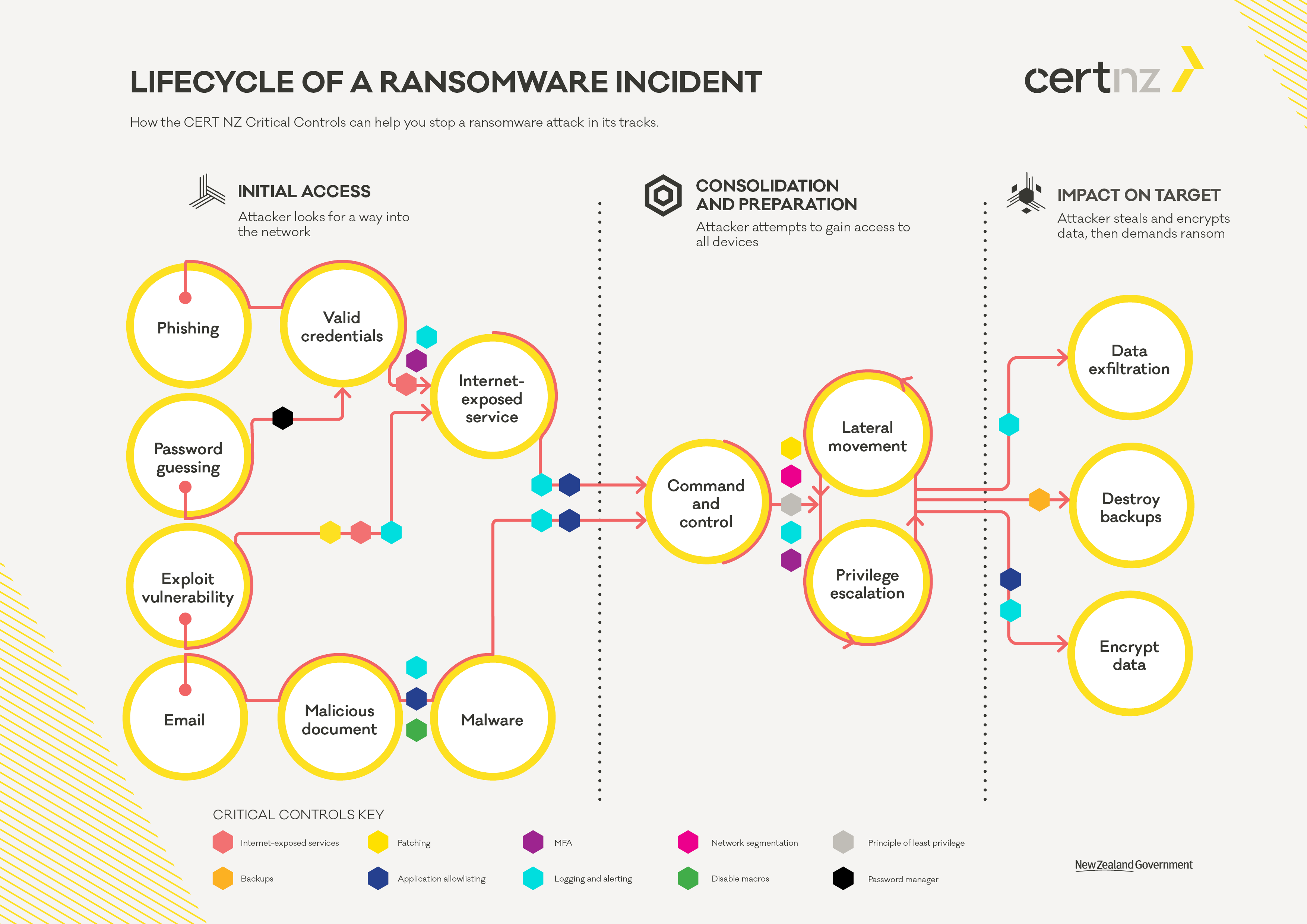
When ransomware activity is detected, limiting additional spread can be urgent. CISA’s response guidance recommends determining impacted systems and isolating them, including disconnecting affected devices or network segments when appropriate.
Prepare isolation decisions
- Who has authority to disconnect systems?
- How can affected endpoints be removed from Wi-Fi or wired networks?
- Can cloud credentials be disabled quickly?
- Can remote access be restricted?
- How can teams communicate if corporate email is untrusted?
Do not improvise destructive actions that may erase volatile evidence. During a serious incident, coordinate with qualified incident responders and law enforcement where appropriate.
Use Out-of-Band Communication
If attackers have access to corporate email or chat, discussing the response inside those systems can expose the recovery plan.
Prepare an alternative channel
- Emergency phone tree.
- Pre-approved external conferencing account.
- Contact details stored offline.
- Incident contacts for insurer, legal counsel and IT provider.
- Law-enforcement and government reporting information.
Keep the emergency contact list available somewhere other than the systems that may be encrypted.
Preserve Evidence Before Rebuilding Everything
There is pressure to wipe affected machines immediately, but evidence can help determine how attackers entered, what they accessed and whether the same compromise will return after restoration.
CISA recommends preserving relevant system images, memory and logs during incident analysis when feasible and coordinating these actions with experienced responders.
Potential evidence sources
- Authentication logs.
- Endpoint security alerts.
- Firewall logs.
- Cloud activity logs.
- Email security records.
- Affected system images.
- Suspicious account changes.
A small company may need outside forensic assistance. Include potential vendors in the incident plan before a crisis.
Do Not Restore Into a Still-Compromised Environment
A backup can be clean while the environment it is restored into is not. If attackers still control an administrator account or persistence remains on another server, restored systems may be compromised again.
Before restoration
- Understand the likely initial compromise.
- Disable or reset affected credentials.
- Patch exploited vulnerabilities.
- Remove malicious persistence.
- Prepare a clean recovery environment or network segment.
- Validate backup integrity.
- Restore systems in dependency order.
- Monitor aggressively after reconnection.
CISA specifically warns organizations to avoid re-infecting clean systems during recovery and recommends restoring prioritized critical services from offline encrypted backups.
Credential Reset Needs a Sequence
Ransomware incidents often involve stolen credentials. Resetting one user password is not enough if administrator sessions, API keys or remote-access credentials were compromised.
Prioritize
- Identity-provider administrators.
- Domain/cloud administrators.
- Email administrator accounts.
- Backup administrator credentials.
- Remote access/VPN accounts.
- Service accounts.
- API keys and tokens.
- Normal user passwords where affected.
Reset credentials from clean trusted devices and revoke active sessions where platforms support it.
For stronger account protection after recovery, see our MFA guide and the new passkeys draft.
Prioritize Restoration by Business Dependency
Recovery order should follow business services rather than whichever backup is easiest to restore.
Example order
- Clean identity and administrator access.
- Network, DNS and core security controls.
- Primary databases.
- Revenue-generating applications.
- Employee file and communication services.
- Lower-priority internal applications.
Document dependencies in advance so the recovery team does not discover during the incident that the ecommerce application depends on a license server nobody restored.
Communications Must Be Accurate and Coordinated
Ransomware may become a customer, employee or regulatory communication issue, particularly when data was stolen.
Prepare roles for
- Employee updates.
- Customer support messaging.
- Partner communication.
- Media inquiries.
- Legal notification.
- Law-enforcement coordination.
Do not speculate publicly about what was or was not stolen before evidence supports the statement. Legal notification requirements vary by jurisdiction and data type, so obtain qualified advice.
Ransom Payment Is Not a Recovery Plan
A business should not design resilience around the assumption that paying an attacker will restore operations. Payment does not guarantee reliable decryption, prevent stolen data from being published or remove attacker access.
Incident response decisions can involve legal, insurance and law-enforcement considerations. Organizations should coordinate with appropriate professionals and authorities rather than treating ransom as a normal procurement decision.
Run a Tabletop Exercise Twice a Year

A tabletop exercise is a discussion-based simulation. It can reveal missing phone numbers and unclear responsibilities without touching production systems.
Example scenario
“Monday at 9:00 AM, employees report that shared files cannot be opened. The monitoring system shows several servers encrypting files. Email still works, but one administrator account has suspicious logins.”
Ask the team
- Who declares the incident?
- Who isolates systems?
- What communication channel is used?
- Where are backups?
- What is restored first?
- Who contacts outside responders?
- Who approves customer communication?
Record gaps and update the plan immediately after the exercise.
Ransomware Recovery Checklist
- Critical asset inventory current.
- System dependencies documented.
- Offline/isolated backup available.
- Restore test completed recently.
- Backup credentials separated.
- Incident contacts stored offline.
- Isolation authority defined.
- Out-of-band communication available.
- Credential-reset sequence documented.
- Recovery priorities defined.
- Evidence-preservation plan available.
- Tabletop exercise scheduled.
Frequently Asked Questions
Are cloud backups safe from ransomware?
They can be, but only if access, retention and deletion protections are designed well. Attackers with cloud administrator credentials may attempt to delete accessible backups. Use separate credentials, versioning or immutability where appropriate and test restoration.
Should an infected computer be turned off immediately?
Containment is important, but powering off can destroy volatile forensic evidence. CISA recommends isolation and provides context for shutdown decisions. Serious incidents should involve qualified responders.
Can we restore as soon as we find a clean backup?
Not safely unless the compromise has been contained. Restore into a clean environment after addressing the access or vulnerability that enabled the incident.
How often should we test ransomware recovery?
Test backups regularly and run periodic incident exercises. The right frequency depends on business risk and how often systems change.
Conclusion
Ransomware recovery is a coordinated business process, not a single backup restore. Identify critical systems, maintain backups that can survive an account compromise, prepare isolation and alternate communications and know how credentials will be reset.
During recovery, preserve useful evidence, remove the original access path and restore into a clean environment in business-priority order. Test the process before an emergency. A small business may not be able to prevent every attack, but it can make one incident far less likely to become an irreversible operational crisis.